
環境
今回の記事は以下の環境で作成した。
- Eclipse 2024
- Java 21
- Spring Boot 4.0.x
- Maven
- Thymeleaf
- H2 Database
- Spring Data JDBC
辞書データ
クジラハンドさんが提供してくれている辞書データをダウンロードする

https://kujirahand.com/web-tools/EJDictFreeDL.php?key=5fe1bb503f0729c2052dbf3247da628a&type=0
kujirahand.com
プロジェクトを作成
- エクリプスにて新規->SpringBoot->Spring スタータープロジェクト
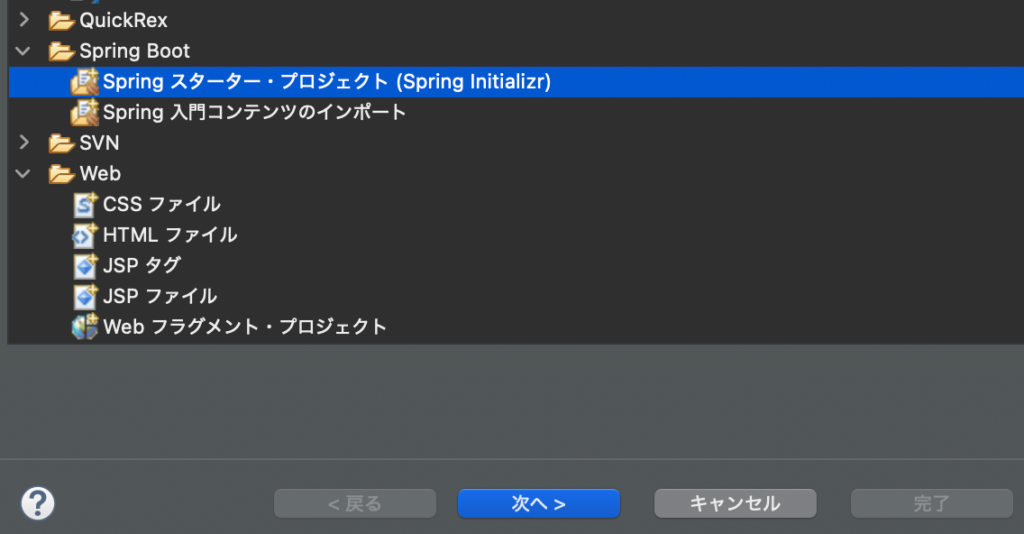
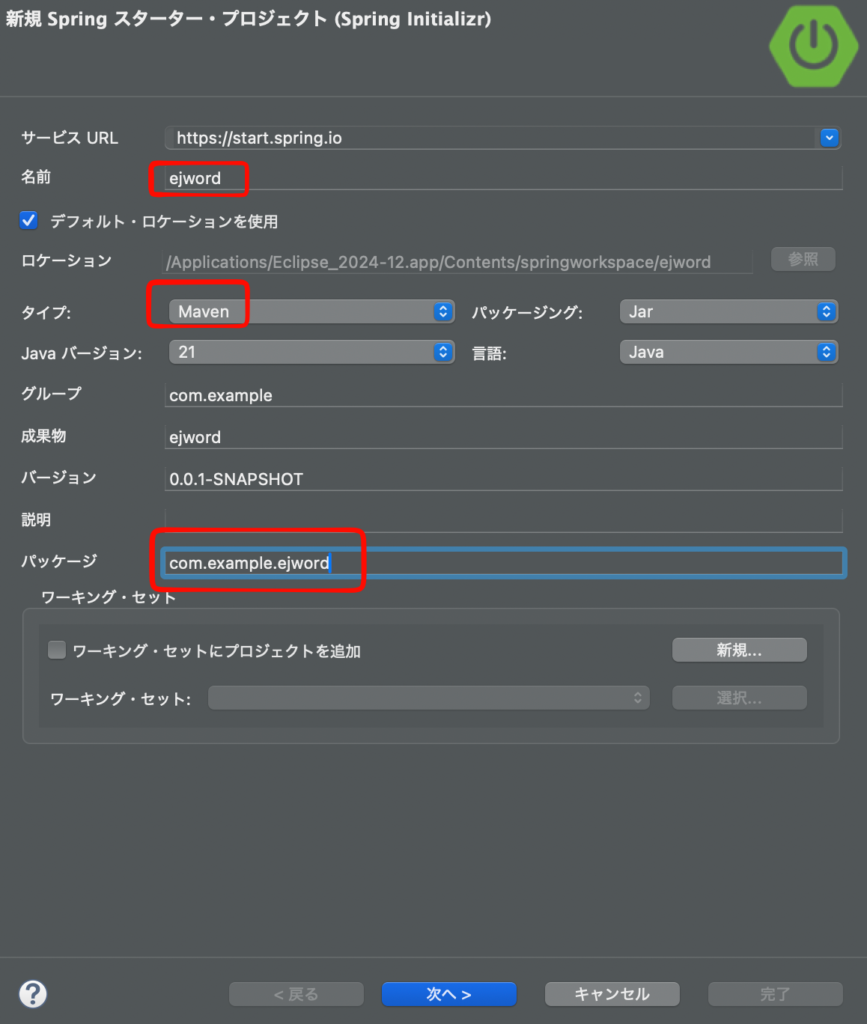
- 以下は設定の一例。Mavenを使い、Javaは21を使用する
- 依存関係として以下を選択
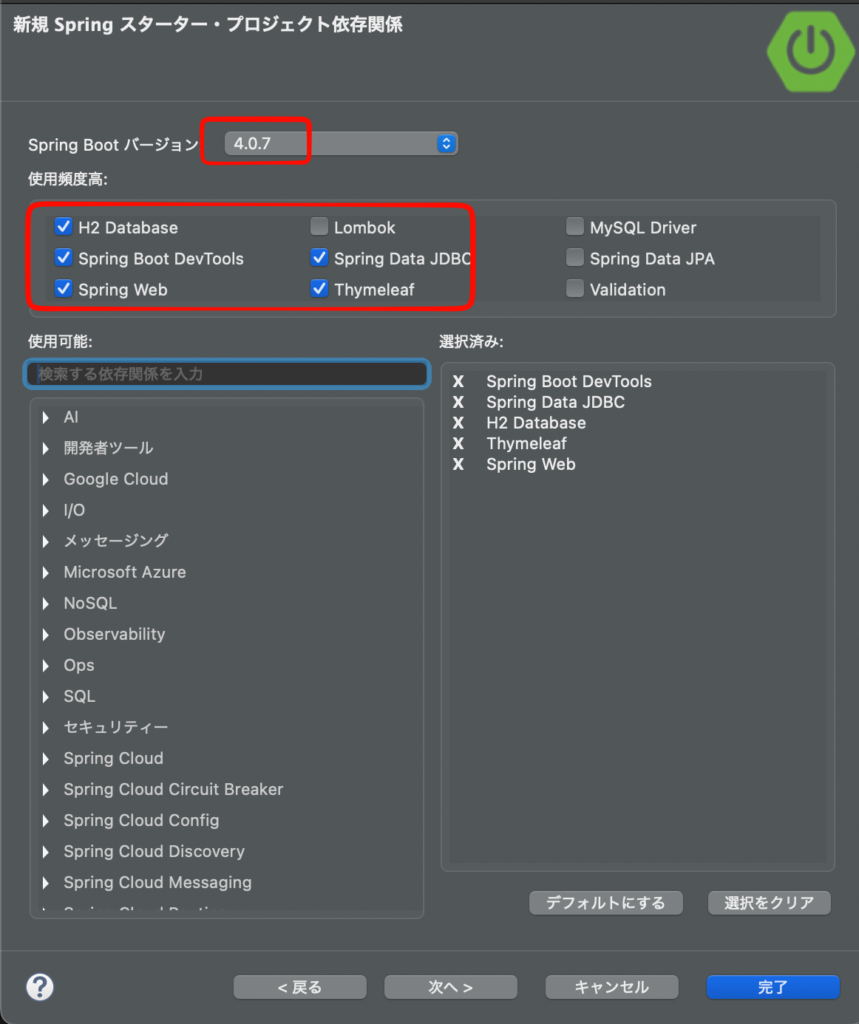
- 役割は以下
Spring Web → ControllerでURLを受ける
Thymeleaf → HTMLテンプレート表示
Spring Data JDBC → JdbcTemplateでDB操作
H2 Database → 開発用の軽量DB
DevTools → 開発中の自動再起動など
起動確認
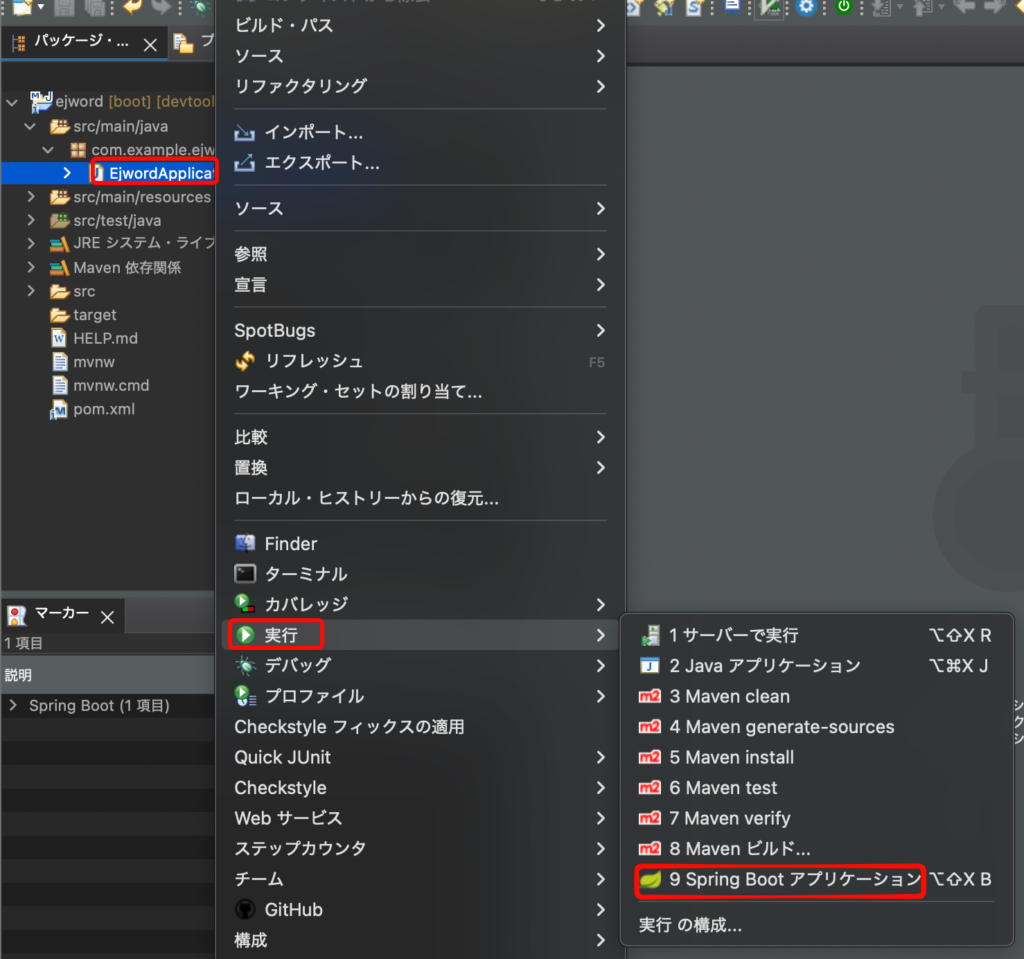
- パッケージビューを開く
- EjwordApplication.javaを右クリックから->実行->SpringBootアプリケーション
- ブラウザで実行URLは以下
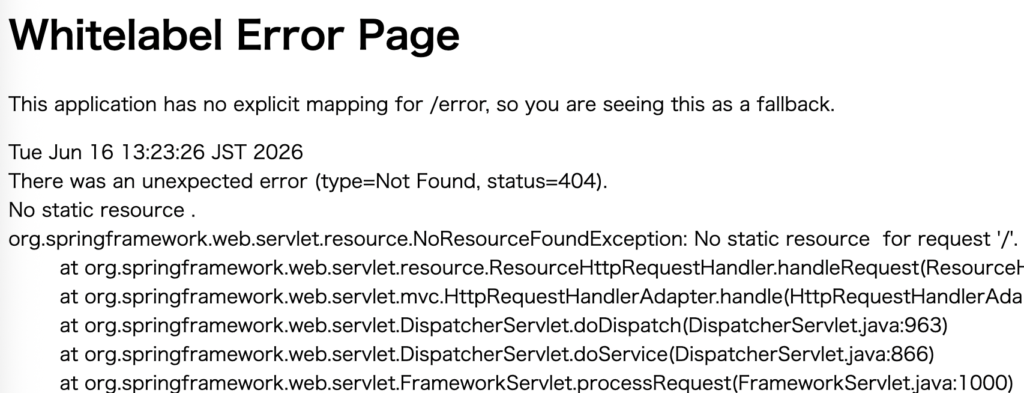
http://localhost:8080/- 以下のようなError画面が表示されればOK。無事にアプリが起動している
Controllerの作成
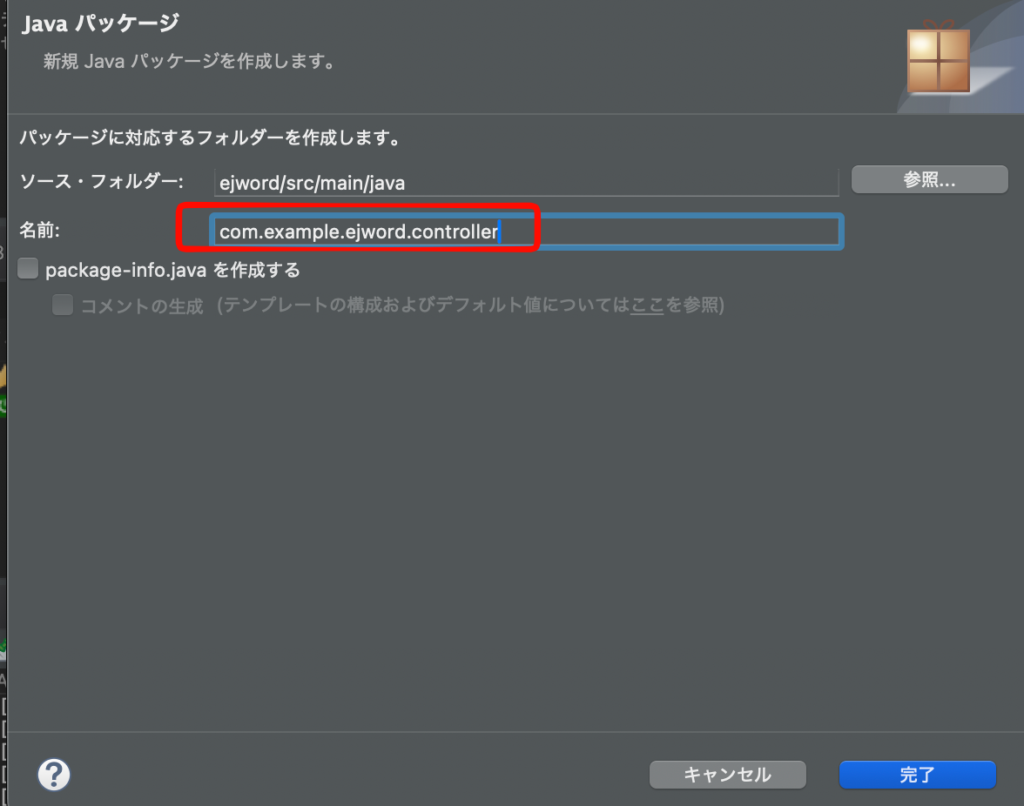
- パッケージ com.example.ejword の下に、controllerパッケージを作成
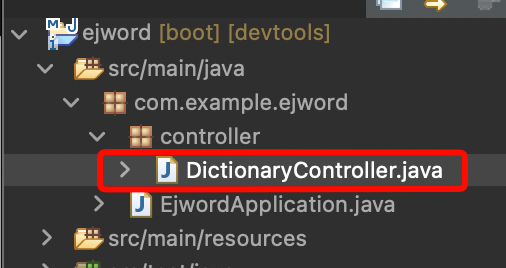
- controllerパーケージの中に新規クラス->DictionaryController.javaを作成する。
- 内容は以下
package com.example.ejword.controller;

import org.springframework.stereotype.Controller;
import org.springframework.web.bind.annotation.GetMapping;

@Controller
public class DictionaryController {
	@GetMapping("/")
	public String index() {
		return "index";
	}

}
viewの作成
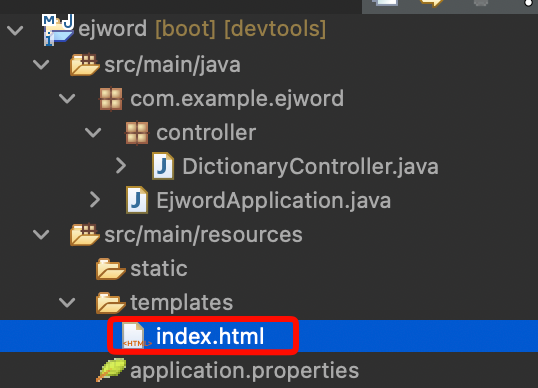
- src/main/resources/templates/index.htmlを作成
- 内容は以下
<!doctype html>
<html lang="ja">
<head>
    <meta charset="UTF-8">
    <title>英和辞書アプリ</title>
</head>
<body>
    <h1>英和辞書アプリ</h1>
    <form method="get" action="/">
        <input type="text" name="q">
        <button type="submit">検索</button>
    </form>
</body>
</html>
確認
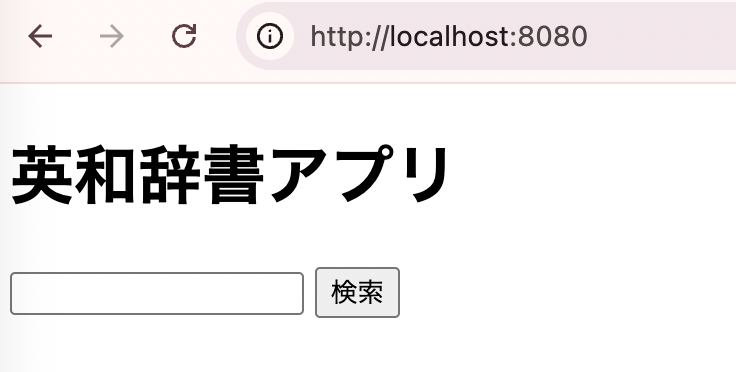
ブラウザで確認してみよう。
http://localhost:8080/- 以下のように表示されれば成功だ
辞書DB作成
辞書データ配置
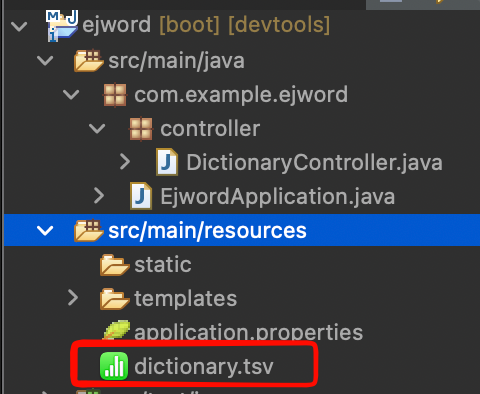
- ダウンロードした辞書データを解凍し、ejdict-hand-utf8.txtというファイルをdictionary.tsvにリネーム
- src/main/resources/dictionary.tsvに配置
テーブル作成
src/main/resources/schema.sqlを作成。
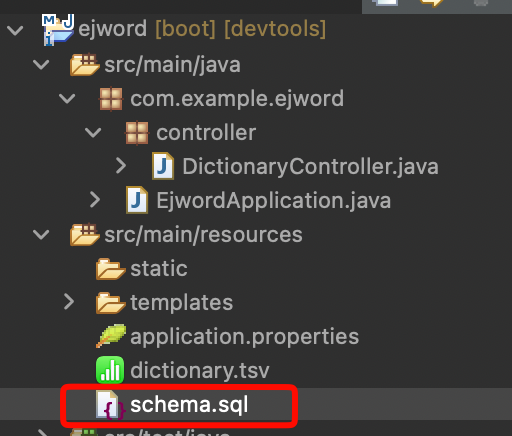
- 内容は以下
CREATE TABLE dictionary_entries (
    id BIGINT AUTO_INCREMENT PRIMARY KEY,
    word VARCHAR(255) NOT NULL,
    meaning CLOB NOT NULL
);

CREATE INDEX idx_dictionary_entries_word
ON dictionary_entries(word);application.propertiesを設定
src/main/resources/application.propertiesを以下のように追記
spring.application.name=ejword

spring.datasource.url=jdbc:h2:mem:ejdb
spring.datasource.driver-class-name=org.h2.Driver
spring.datasource.username=sa
spring.datasource.password=

spring.sql.init.mode=always

spring.h2.console.enabled=true
spring.h2.console.path=/h2-console
CommandLineRunnerの作成
アプリ起動時にDBが作成されるようする。
- com.example.ejword.configパッケージを作成する
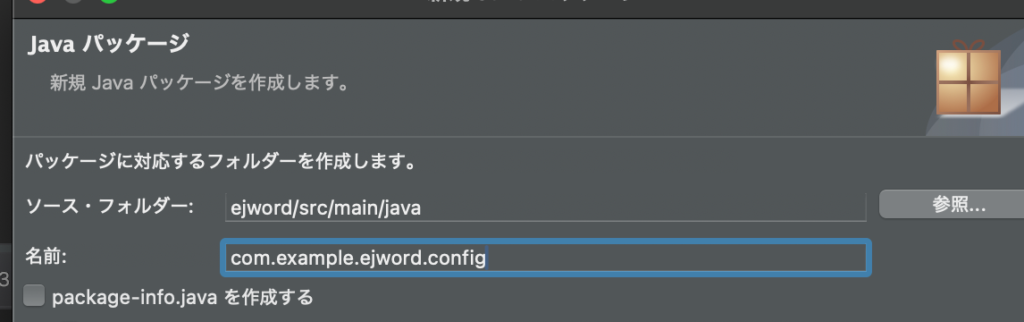
- configパッケージ内に新規クラスからDictionaryDataLoader.javaを作成する
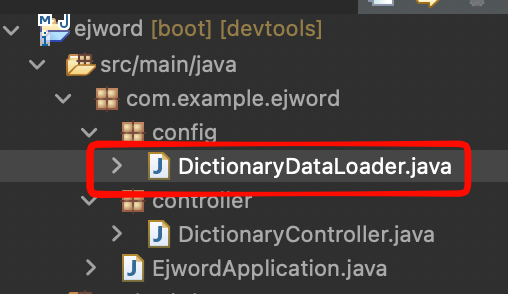
- 内容は以下
package com.example.ejword.config;

import java.io.BufferedReader;
import java.io.InputStreamReader;

import org.springframework.boot.CommandLineRunner;
import org.springframework.core.io.ClassPathResource;
import org.springframework.jdbc.core.JdbcTemplate;
import org.springframework.stereotype.Component;

@Component
public class DictionaryDataLoader implements CommandLineRunner {
	//application.properties のDB接続情報をもとにDB操作ができるインスタンスが注入される。
	private final JdbcTemplate jdbcTemplate;
	public DictionaryDataLoader(JdbcTemplate jdbcTemplate) {
		this.jdbcTemplate = jdbcTemplate;
	}

	@Override
	public void run(String... args) throws Exception {
		Integer count = jdbcTemplate.queryForObject("SELECT COUNT(*) FROM dictionary_entries", Integer.class);
		//2重に作成するのをガード
		if(count != null && count > 0) {
			return;
		}

		ClassPathResource resource = new ClassPathResource("dictionary.tsv");
		try(BufferedReader br = new BufferedReader(new InputStreamReader(resource.getInputStream(),"UTF-8"))){
			String line;
			int insertCount=0;
			while((line = br.readLine()) != null){
				//空白行はスキップ
				if(line.isBlank()) {
					continue;
				}
				String[] parts = line.split("\t",2);
				//異常データはスキップ
				if(parts.length < 2) {
					continue;
				}
				String word = parts[0].trim();
				String meaning = parts[1].trim();
				//どちらか空の場合もスキップ
				if(word.isEmpty() || meaning.isEmpty()) {
					continue;
				}
				jdbcTemplate.update(
						"INSERT INTO dictionary_entries(word,meaning) VALUES (?,?)",
						word,
						meaning
				);
				insertCount++;
			}
			System.out.println("ロード完了:"+insertCount);
		}

	}
}
- ここまでできたら実行してみよう。コンソールに以下のように表示されれば成功だ

recordの作成
検索結果でインスンスを作る際に便利なrecordを作成していこう。recordが初めてな人はこの記事に目を通しておくこと。
- com.example.ejword.dtoパッケージを作成(dtoはData Transfer Objectの略)
- 新規 -> record -> DictionaryEntry.javaを作成
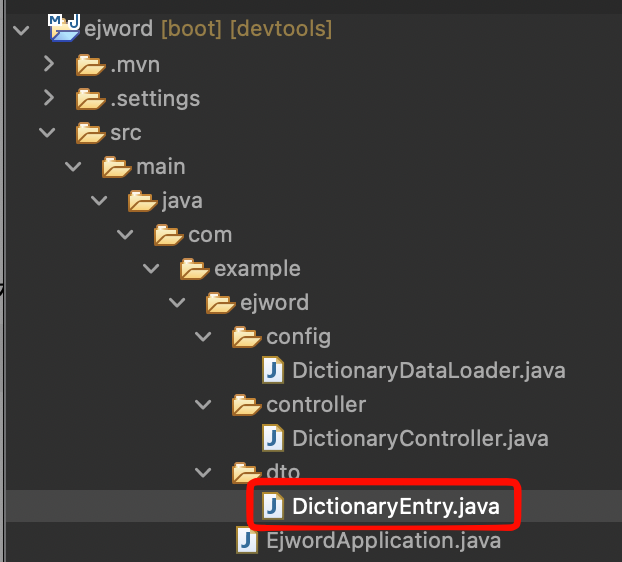
- DictionaryEntry.javaの内容は以下
package com.example.ejword.dto;

public record DictionaryEntry(
		Long id,
		String word,
		String meaning
		) {
}
Repository
DBを操作するRepositoryを作成する
- com.example.ejword.repositoryパッケージを作成
- DictionaryRepository.javaを作成する。
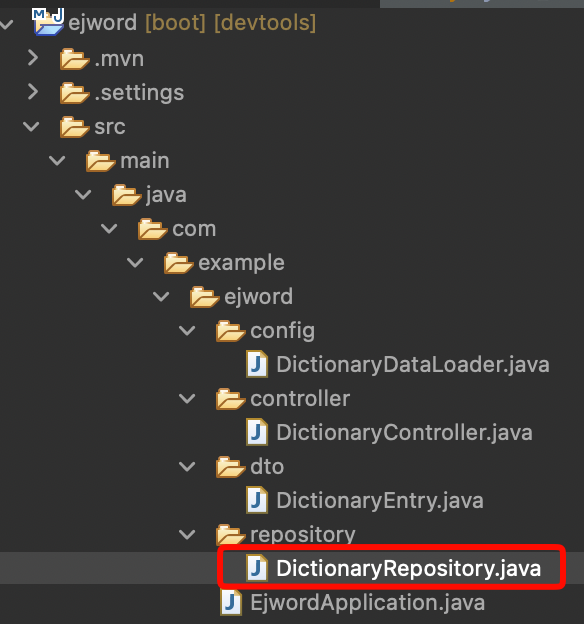
- 内容は以下
package com.example.ejword.repository;

import java.util.List;

import org.springframework.jdbc.core.JdbcTemplate;
import org.springframework.stereotype.Repository;

import net.joytas.ejapp.dto.DictionaryEntry;

@Repository
public class DictionaryRepository {

    private final JdbcTemplate jdbcTemplate;

    public DictionaryRepository(JdbcTemplate jdbcTemplate) {
        this.jdbcTemplate = jdbcTemplate;
    }

    public List<DictionaryEntry> search(String q, String match, int limit, int offset) {
        String sql = """
                SELECT id, word, meaning
                FROM dictionary_entries
                WHERE LOWER(word) LIKE LOWER(?)
                ORDER BY word
                LIMIT ? OFFSET ?
                """;

        String pattern = createPattern(q, match);

        return jdbcTemplate.query(
                sql,
                (rs, rowNum) -> new DictionaryEntry(
                        rs.getLong("id"),
                        rs.getString("word"),
                        rs.getString("meaning")
                ),
                pattern,
                limit,
                offset
        );
    }

    public int count(String q, String match) {
        String sql = """
                SELECT COUNT(*)
                FROM dictionary_entries
                WHERE LOWER(word) LIKE LOWER(?)
                """;

        String pattern = createPattern(q, match);

        Integer count = jdbcTemplate.queryForObject(sql, Integer.class, pattern);
        return count == null ? 0 : count;
    }

    private String createPattern(String q, String match) {
        if (q == null || q.isBlank()) {
            return "%";
        }

        String keyword = q.trim();

        return switch (match) {
            case "exact" -> keyword;
            case "contains" -> "%" + keyword + "%";
            case "startsWith" -> keyword + "%";
            default -> keyword + "%";
        };
    }
}
Controllerを検索対応に変更
- 作成済みのDictionaryController.javaを以下のように書き換え
package com.example.ejword.controller;

import java.util.List;

import org.springframework.stereotype.Controller;
import org.springframework.ui.Model;
import org.springframework.web.bind.annotation.GetMapping;
import org.springframework.web.bind.annotation.RequestParam;

import net.joytas.ejapp.dto.DictionaryEntry;
import net.joytas.ejapp.repository.DictionaryRepository;

@Controller
public class DictionaryController {

    private final DictionaryRepository dictionaryRepository;

    public DictionaryController(DictionaryRepository dictionaryRepository) {
        this.dictionaryRepository = dictionaryRepository;
    }

    @GetMapping("/")
    public String index(
            @RequestParam(name = "q", required = false, defaultValue = "") String q,
            @RequestParam(name = "match", required = false, defaultValue = "startsWith") String match,
            @RequestParam(name = "page", required = false, defaultValue = "1") int page,
            Model model) {

        int pageSize = 20;
        int currentPage = Math.max(page, 1);
        int offset = (currentPage - 1) * pageSize;

        List<DictionaryEntry> entries = dictionaryRepository.search(q, match, pageSize, offset);
        int total = dictionaryRepository.count(q, match);

        int totalPages = (int) Math.ceil((double) total / pageSize);
        int start = total == 0 ? 0 : offset + 1;
        int end = Math.min(offset + pageSize, total);

        model.addAttribute("q", q);
        model.addAttribute("match", match);
        model.addAttribute("entries", entries);
        model.addAttribute("total", total);
        model.addAttribute("page", currentPage);
        model.addAttribute("totalPages", totalPages);
        model.addAttribute("start", start);
        model.addAttribute("end", end);
        model.addAttribute("hasPrev", currentPage > 1);
        model.addAttribute("hasNext", currentPage < totalPages);

        return "index";
    }
}
index.htmlの変更
- index.htmlを以下のように書き換える
<!doctype html>
<html lang="ja" xmlns:th="http://www.thymeleaf.org">
<head>
    <meta charset="UTF-8">
    <title>英和辞書アプリ</title>
    <meta name="viewport" content="width=device-width, initial-scale=1">

    <link href="https://cdn.jsdelivr.net/npm/bootstrap@5.3.3/dist/css/bootstrap.min.css"
          rel="stylesheet">
</head>
<body class="bg-light">

<div class="container py-4">

    <h1 class="mb-4">英和辞書アプリ</h1>

    <form method="get" action="/" class="card card-body mb-4">
        <div class="row g-2 align-items-end">
            <div class="col-md-6">
                <label for="q" class="form-label">検索語</label>
                <input type="text"
                       id="q"
                       name="q"
                       class="form-control"
                       th:value="${q}"
                       placeholder="例: apple">
            </div>

            <div class="col-md-4">
                <label for="match" class="form-label">検索条件</label>
                <select id="match" name="match" class="form-select">
                    <option value="startsWith" th:selected="${match == 'startsWith'}">で始まる</option>
                    <option value="contains" th:selected="${match == 'contains'}">を含む</option>
                    <option value="exact" th:selected="${match == 'exact'}">完全一致</option>
                </select>
            </div>

            <div class="col-md-2">
                <button type="submit" class="btn btn-primary w-100">検索</button>
            </div>
        </div>
    </form>

    <div th:if="${total > 0}" class="mb-3 text-muted">
        <span th:text="${total}"></span> 件中
        <span th:text="${start}"></span> 〜
        <span th:text="${end}"></span> 件を表示
    </div>

    <div th:if="${total == 0 and q != ''}" class="alert alert-warning">
        該当する単語は見つかりませんでした。
    </div>

    <div class="list-group mb-4" th:if="${total > 0}">
        <div class="list-group-item" th:each="entry : ${entries}">
            <h5 class="mb-1" th:text="${entry.word}">word</h5>
            <p class="mb-0" th:text="${entry.meaning}">meaning</p>
        </div>
    </div>

    <nav th:if="${totalPages > 1}">
        <ul class="pagination justify-content-center">
            <li class="page-item" th:classappend="${!hasPrev} ? 'disabled'">
                <a class="page-link"
                   th:href="@{/(q=${q}, match=${match}, page=${page - 1})}">
                    前へ
                </a>
            </li>

            <li class="page-item disabled">
                <span class="page-link">
                    <span th:text="${page}"></span> /
                    <span th:text="${totalPages}"></span>
                </span>
            </li>

            <li class="page-item" th:classappend="${!hasNext} ? 'disabled'">
                <a class="page-link"
                   th:href="@{/(q=${q}, match=${match}, page=${page + 1})}">
                    次へ
                </a>
            </li>
        </ul>
    </nav>

</div>

</body>
</html>
今回はbootstrapでスタイルをつけている
実行
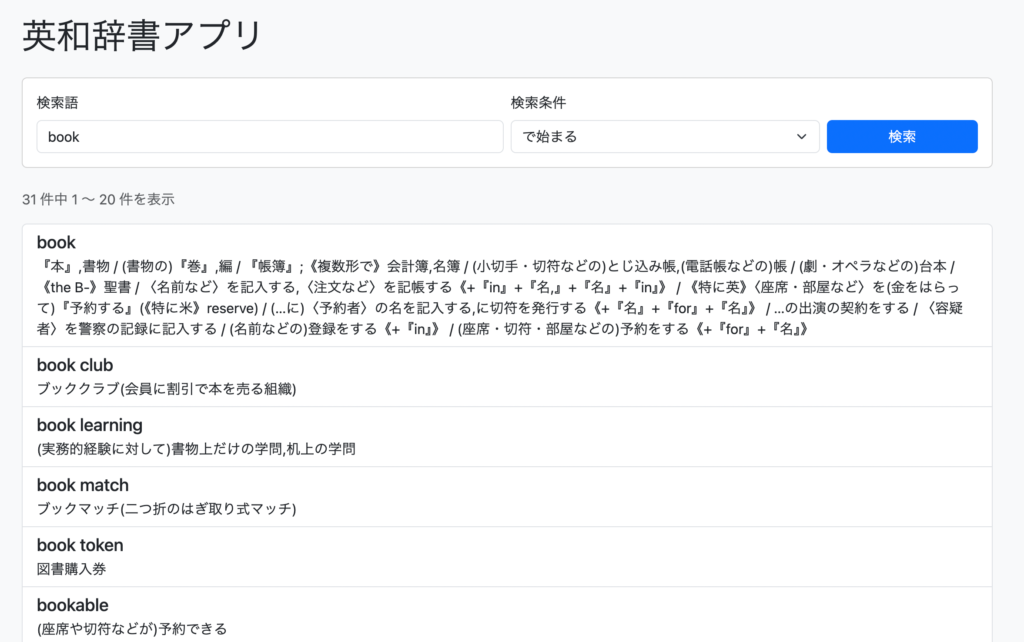
- ブラウザ実行してみよう
http://localhost:8080/- 以下のように辞書アプリとして機能すれば成功だ


コメント