REST API を学ぶ際、
「サーバー側は作れるようになったが、クライアントからどう利用されるのかが実感しづらい」
と感じることは少なくない。
前回の記事では MockAPI を利用し、
バックエンドを実装せずに REST API を用意する方法を紹介した。
本記事ではその続編として、Python から MockAPI にアクセスするターミナルアプリを作成する。
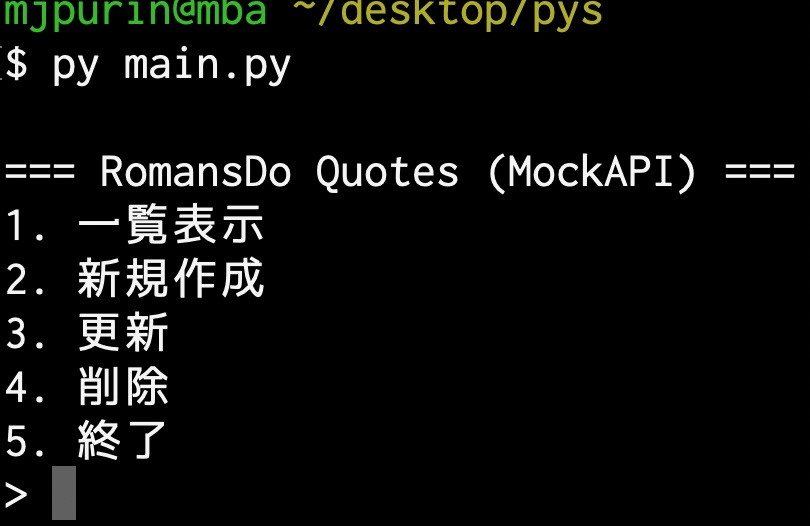
- 実行中イメージ
作成
今回のアプリはMockAPIを使ったREST APIがすでに準備されていることが前提となる。まだの人はこの記事からまずは作成してもらいたい。無料かつ10分で作成できる。

APIの準備ができたら、さっそくPythonのコーディングに入ろう。作成するファイルは
main.py
の1枚だけだ。(requestsモジュールを環境にインストールしておくこと)
- main.py
import requests

# 👇 自分の MockAPI の URL に書き換える
BASE_URL = "https://69368643f8dc350aff312a6c.mockapi.io/quotes"

HEADERS = {
    "Content-Type": "application/json"
}

# 一覧取得
def get_quotes():
    res = requests.get(BASE_URL)
    res.raise_for_status()
    return res.json()

# 新規作成
def create_quote():
    jp = input("日本語 (jp): ")
    en = input("英語 (en): ")
    description = input("説明: ")

    payload = {
        "jp": jp,
        "en": en,
        "description": description
    }

    res = requests.post(BASE_URL, json=payload, headers=HEADERS)
    res.raise_for_status()
    print("✔ 作成しました")

# 更新
def update_quote():
    id = input("更新するID: ").strip()

    # 既存データ取得
    res = requests.get(f"{BASE_URL}/{id}")
    if res.status_code == 404:
        print("そのIDは存在しません")
        return
    res.raise_for_status()
    q = res.json()

    print("\n--- 現在の内容 ---")
    print("JP :", q["jp"])
    print("EN :", q["en"])
    print("DESC:", q["description"])
    print("------------------\n")

    jp = input("新しい日本語(Enterで変更なし): ").strip() or q["jp"]
    en = input("新しい英語(Enterで変更なし): ").strip() or q["en"]
    desc = input("新しい説明(Enterで変更なし): ").strip() or q["description"]

    payload = {
        "jp": jp,
        "en": en,
        "description": desc
    }

    requests.put(f"{BASE_URL}/{id}", json=payload)
    res.raise_for_status()
    print("✔ 更新しました")

# 削除
def delete_quote():
    quote_id = input("削除するID: ")
    confirm = input(f"ID {quote_id} を削除しますか? (y/n): ")

    if confirm.lower() != "y":
        print("キャンセルしました")
        return

    res = requests.delete(f"{BASE_URL}/{quote_id}")
    res.raise_for_status()
    print("✔ 削除しました")

# メニュー表示
def show_menu():
    print("\n=== RomansDo Quotes (MockAPI) ===")
    print("1. 一覧表示")
    print("2. 新規作成")
    print("3. 更新")
    print("4. 削除")
    print("5. 終了")

# メイン処理
def main():
    while True:
        show_menu()
        choice = input("> ")

        try:
            if choice == "1":
                quotes = get_quotes()
                for q in quotes:
                    print(f"[{q['id']}] {q['jp']} / {q['en']}")

            elif choice == "2":
                create_quote()

            elif choice == "3":
                update_quote()

            elif choice == "4":
                delete_quote()

            elif choice == "5":
                print("終了します")
                break

            else:
                print("不正な入力です")

        except requests.RequestException as e:
            print("❌ 通信エラー:", e)

if __name__ == "__main__":
    main()
実行してみよう。ターミナルからMockAPIのCRUD操作ができることがわかる
ポイント解説
res = requests.get(BASE_URL)
res.raise_for_status()
1行目で通信を行っているが、この段階では 成功か失敗かの判定は行われていない。
HTTP ステータスが 404 や 500 であっても、例外は発生しない
2行目でもしエラーが発生していれば例外を発生させて処理を即座に終了させることができる。
(成功していれば何もしない)
if __name__ == "__main__":
    main()
このように書くことで、
- このファイルを 直接実行したときだけ main() を呼び出す
- import された場合は、関数定義だけを読み込む
という安全な振る舞いが実現できる。
改良
通信、しているときにUIが止まっているのは気持ちが悪い。通信中であることを伝えるように以下のように修正しよう。
import requests

# 👇 自分の MockAPI の URL に書き換える
BASE_URL = "https://69368643f8dc350aff312a6c.mockapi.io/quotes"

HEADERS = {
    "Content-Type": "application/json"
}


# 一覧取得
def get_quotes():
    print("通信中...", end="", flush=True)
    res = requests.get(BASE_URL)
    print(" 完了")

    res.raise_for_status()
    return res.json()


# 新規作成
def create_quote():
    jp = input("日本語 (jp): ")
    en = input("英語 (en): ")
    description = input("説明: ")

    payload = {
        "jp": jp,
        "en": en,
        "description": description
    }

    print("通信中...", end="", flush=True)
    res = requests.post(BASE_URL, json=payload, headers=HEADERS)
    print(" 完了")

    res.raise_for_status()
    print("✔ 作成しました")


# 更新
def update_quote():
    id = input("更新するID: ").strip()

    # 既存データ取得
    print("通信中...", end="", flush=True)
    res = requests.get(f"{BASE_URL}/{id}")
    if res.status_code == 404:
        print("そのIDは存在しません")
        return
    print(" 完了")
    res.raise_for_status()
    q = res.json()

    print("\n--- 現在の内容 ---")
    print("JP :", q["jp"])
    print("EN :", q["en"])
    print("DESC:", q["description"])
    print("------------------\n")

    jp = input("新しい日本語(Enterで変更なし): ").strip() or q["jp"]
    en = input("新しい英語(Enterで変更なし): ").strip() or q["en"]
    desc = input("新しい説明(Enterで変更なし): ").strip() or q["description"]

    payload = {
        "jp": jp,
        "en": en,
        "description": desc
    }

    print("通信中...", end="", flush=True)
    requests.put(f"{BASE_URL}/{id}", json=payload)
    print(" 完了")

    print("✔ 更新しました")


# 削除
def delete_quote():
    quote_id = input("削除するID: ")
    confirm = input(f"ID {quote_id} を削除しますか? (y/n): ")

    if confirm.lower() != "y":
        print("キャンセルしました")
        return

    print("通信中...", end="", flush=True)
    res = requests.delete(f"{BASE_URL}/{quote_id}")
    print(" 完了")

    res.raise_for_status()
    print("✔ 削除しました")


# メニュー表示
def show_menu():
    print("\n=== RomansDo Quotes (MockAPI) ===")
    print("1. 一覧表示")
    print("2. 新規作成")
    print("3. 更新")
    print("4. 削除")
    print("5. 終了")


# メイン処理
def main():
    while True:
        show_menu()
        choice = input("> ")

        try:
            if choice == "1":
                quotes = get_quotes()
                for q in quotes:
                    print(f"[{q['id']}] {q['jp']} / {q['en']}")

            elif choice == "2":
                create_quote()

            elif choice == "3":
                update_quote()

            elif choice == "4":
                delete_quote()

            elif choice == "5":
                print("終了します")
                break

            else:
                print("不正な入力です")

        except requests.RequestException as e:
            print("❌ 通信エラー:", e)


if __name__ == "__main__":
    main()
通信中と表示することで違和感は解消された。
リファクタリング
先程、追記した部分なのだがDRYの原則(Don’t repeat your self)に反しているともいえる。
一つ関数を追加してリファクタグしよう
import requests

# 👇 自分の MockAPI の URL に書き換える
BASE_URL = "https://69368643f8dc350aff312a6c.mockapi.io/quotes"

HEADERS = {
    "Content-Type": "application/json"
}

# 通信処理をラップして、実行中・完了メッセージを表示する関数
def with_loading(func):
    print("c", end="", flush=True)
    result = func()
    print(" 完了")
    return result

# 一覧取得
def get_quotes():
    res = with_loading(lambda: requests.get(BASE_URL))
    res.raise_for_status()
    return res.json()

# 新規作成
def create_quote():
    jp = input("日本語 (jp): ")
    en = input("英語 (en): ")
    description = input("説明: ")

    payload = {
        "jp": jp,
        "en": en,
        "description": description
    }

    res = with_loading(lambda: requests.post(BASE_URL, json=payload, headers=HEADERS))
    res.raise_for_status()
    print("✔ 作成しました")

# 更新
def update_quote():
    quote_id = input("更新するID: ").strip()

    # 既存データ取得
    res = with_loading(lambda: requests.get(f"{BASE_URL}/{quote_id}"))
    if res.status_code == 404:
        print("そのIDは存在しません")
        return
    res.raise_for_status()

    q = res.json()

    print("\n--- 現在の内容 ---")
    print("JP :", q.get("jp", ""))
    print("EN :", q.get("en", ""))
    print("DESC:", q.get("description", ""))
    print("------------------\n")

    jp = input("新しい日本語(Enterで変更なし): ").strip() or q.get("jp", "")
    en = input("新しい英語(Enterで変更なし): ").strip() or q.get("en", "")
    desc = input("新しい説明(Enterで変更なし): ").strip() or q.get("description", "")

    payload = {
        "jp": jp,
        "en": en,
        "description": desc
    }

    res = with_loading(lambda: requests.put(f"{BASE_URL}/{quote_id}", json=payload, headers=HEADERS))
    res.raise_for_status()
    print("✔ 更新しました")

# 削除
def delete_quote():
    quote_id = input("削除するID: ")
    confirm = input(f"ID {quote_id} を削除しますか? (y/n): ")

    if confirm.lower() != "y":
        print("キャンセルしました")
        return

    res = with_loading(lambda: requests.delete(f"{BASE_URL}/{quote_id}"))
    res.raise_for_status()
    print("✔ 削除しました")

# メニュー表示
def show_menu():
    print("\n=== RomansDo Quotes (MockAPI) ===")
    print("1. 一覧表示")
    print("2. 新規作成")
    print("3. 更新")
    print("4. 削除")
    print("5. 終了")

# メイン処理
def main():
    while True:
        show_menu()
        choice = input("> ")

        try:
            if choice == "1":
                quotes = get_quotes()
                for q in quotes:
                    print(f"[{q['id']}] {q['jp']} / {q['en']}")

            elif choice == "2":
                create_quote()

            elif choice == "3":
                update_quote()

            elif choice == "4":
                delete_quote()

            elif choice == "5":
                print("終了します")
                break

            else:
                print("不正な入力です")

        except requests.RequestException as e:
            print("❌ 通信エラー:", e)

if __name__ == "__main__":
    main()
最後に
今回はPythonでのWebAPIの操作方法を学んだ。requestsモジュールをインポートすることでとても簡単に通信することができる。
[通信中…]ようなUIを追加するだけで使い勝手が大きく向上することも体験出来たのではないだろうか?
今回はターミナルからの操作であったが、TKInterなどを使ってUIを伴ったアプリに仕上げるのも面白いだろう。


コメント